LogoとMenuの設定
2012/01/30
5年以上経過した古い記事です(Joomla2.5)
YooThemeをセレクトしたらまずLogoとMenuを設定しよう。
Logoの表示
Logo画像をUPした後、エクステンション→モジュール管理→新規→カスタムHTMLを選択
表示位置:logo
<p><img src="/images/logo.png" border="0" alt="logo" width="250" height="35" /></p>
これでLogo画像を表示出来ます。
Logo画像の表示がズレる場合は「margin」等で調整してください。
例
<p style="margin: 0px 0px -20px;"><img src="/images/logo.png" border="0" alt="logo" width="250" height="35" /></p>
Menuの表示
メニュー→Main Menuを記入後、エクステンション→モジュール管理→新規→メニューを選択
表示位置:menu
これでMainMenuが表示されます。
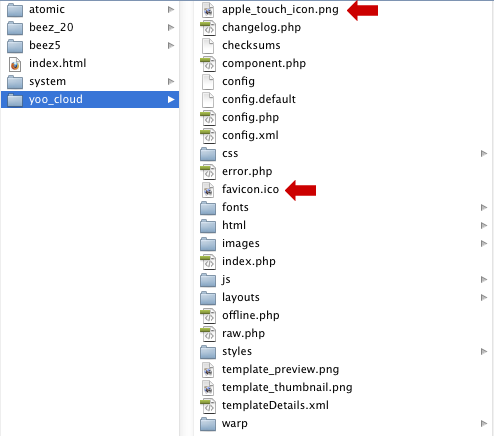 faviconの変更
各Theme内のfavicon.icoを差し替えてください。
※iPhone/iPad様は「apple_touch_icon.png」を差し替えてください。
- 機能拡張のアップデートを無効化
- テーマのアップグレードで405error
- PHP制限max_execution_timeを定義する
- PleskがようやくWebPサポート
- 日付問題
- マウスオーバーで画像をランダム表示
- Adobe AnimateをYOOtheme Proに埋め込み
- Adobe Animate
- アップロードファイル容量の変更
- GMOドメインとサブドメインの設定方法
- 異なるPHPバージョンの利用
- JCK EditorからArk Editorへ
- メインで使うメーラーはPOPで設定
- Photoshopでタイムラインを使う
- PleskのPHPは.webpをサポートしていない
- .webpの準備をしよう
- .htaccessとweb.configのセキュリティアップデート
- PageBuilderで作ったページに作成日や更新日が表示出来ない
- YOOtheme ProでGoogle日本語フォントを使う
- 世の中のCMSはPageBuilder機能の搭載へシフトしている